CMprint Firmware & Release Notes
Firmware Upgrade Process :
- Procedure:
- Check the current version of CMprint
- Access the CMprint configuration menu.
- Identify the currently installed version.
- Rename the update file (if necessary)
- If the installed version is 1.5 or earlier:
- Rename the
update.usbCartadisfile to.usbCartadis.
- If the installed version is 1.6 or later:
- No file modification is necessary.
- Copy the update files to the USB drive
- Copy the following files to the root of the USB drive:
update.usbCartadis(or.usbCartadisas applicable)CMPrint_vX.X.X.tar.gz
- Install the update
- Insert the USB drive into the CMprint device's USB port.
- Follow the on-screen instructions to start the update.
- Wait for the process to complete and ensure no errors appear.
- Post-update verification
- Restart CMprint if necessary.
- Access the configuration menu and verify that the displayed version is
the new one
⚠️ IMPORTANT – COMPATIBILITY NOTICE (2.0.0)
Compatibility / End of Support
As of May 31, 2026, the PrinterKiosk service will no longer support versions earlier than 2.0.0.
2.0.0 or later will be required to ensure service compatibility. Please update your installation accordingly or contact support if you need assistance. CMprint installation accordingly or contact support if you need assistance.
New features
• PrinterKiosk features
o Added document preview visualization in the PrinterKiosk print workflow.
o Print job release workflow has been unified across PrinterKiosk and USB printing, ensuring accurate accounting based on the actual number of pages printed.
o Optimized document processing to improve print job availability time after email submission.
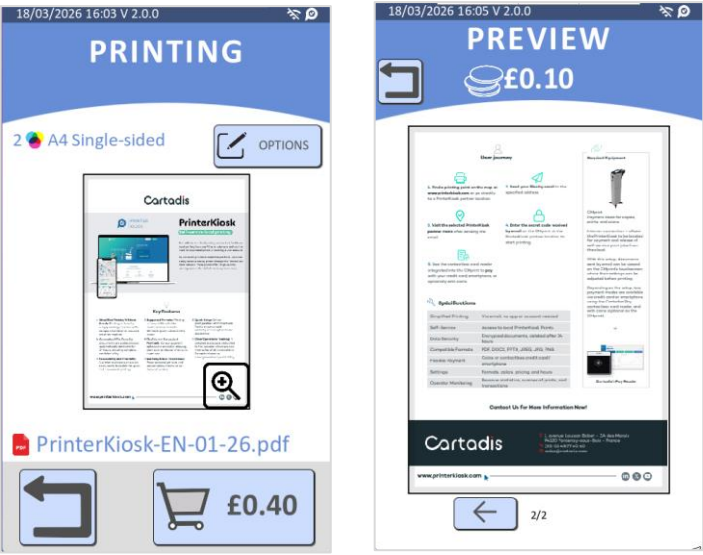
• Bank card payment (Cartadis’nPay)
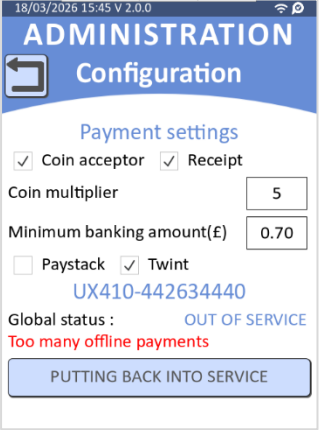
o Added offline payment limit
▪ Added a consecutive offline payment counter.
▪ Card payment is automatically disabled after 20 consecutive offline transactions.
▪ A new status "Too many offline payments" is displayed in Administration → Configuration → Payment, with a manual reset button to restore card payment availability.
o Added default minimum amount
▪ Enforced a default minimum card payment amount of 20 cents when Cartadis’nPay is present, ensuring alignment with payment backend service.
▪ Existing setups with a minimum below 20 cents will be automatically updated, while those already configured above remain unaffected.
▪ To set a minimum below 20 cents (down to 10 cents), contact the support team
• Supported countries / Languages
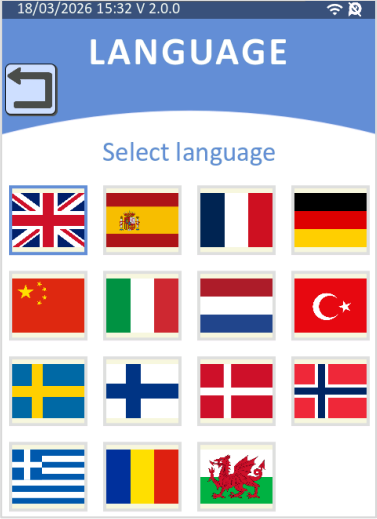
o Added support for Wales, Sweden, Norway, Finland, and Denmark
Bug fixes and small enhancements
• Scan Management
o Ricoh MFP support: Fixed a communication error occurring on Ricoh devices when switching between ADF Duplex and Flatbed scan sources. Both scan modes now work correctly regardless of the order in which they are used
o Truncated scan: Fixed a scan truncation issue introduced in v1.9.0 where scanning an A4 Portrait document via ADF would produce a cropped PDF.
• Print Management
o Printers incompatible with IPP: Improved support for some non-IPP printers and enable duplex by default on these models (Generic PostScript driver configuration case). Duplex can still be disabled via the technician menus.
o Konica Minolta MFP support: Fixed an incorrect page count on Konica Minolta devices (e.g., Bizhub C224e, C227) during duplex printing, where pages were counted per sheet instead of per side.
• Copy Management
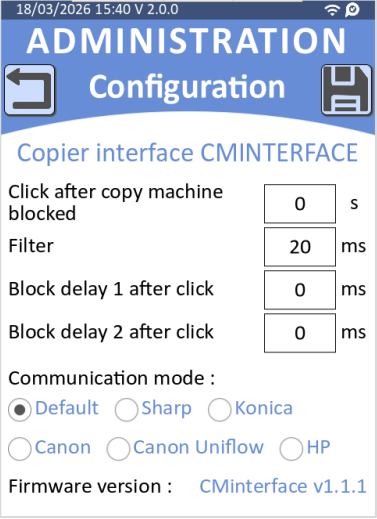
o HP MFP support: Full Copy Management Support
▪ Added large format copy support for HP devices running latest HP firmware 5.9.
▪ Requires new firmware CMInterface 1.1.0 or KCC 1.1.0.
▪ HP firmware must be minimum 5.9 and the feature activated via XTP (before enabling HP mode on CMprint).
o Canon MFP in Uniflow mode: Improved support
▪ Fixed accounting issues in Canon Uniflow mode.
▪ Renamed Canon-C2 protocol to Canon Uniflow.
▪ In this mode, copy counters details are limited in the CMprint statistics (color or format are unavailable)
▪ Requires firmware SIM 1.0.3 or CMInterface 1.1.1 or later.
• UI
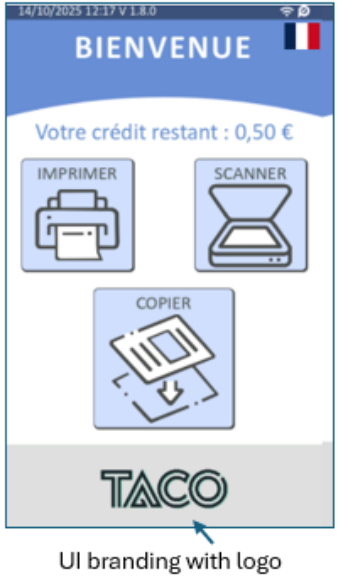
o Fixed branding logo scaling, ensuring logos are correctly sized. CMprint release notes 4
• Bank card payment (Cartadis’nPay)
o Improved wrong configuration diagnostic messages
▪ Unsupported currency configuration: Improved the error message in such case (previously generic error code 0x1201) reducing diagnostic time for technicians.
▪ Incorrect system clock: Added error code 0x1204 to explicitly identify payment failures caused by an out-of-range system clock.
Upgrade information
- The network flows to Cartadis backend servers have changed with this new version. In case you have network flows filtering, please consult the dedicated article in our Knowledge Base and update the required flows prior to the upgrade.
Version 1.9.0: 17th February 2026
New features
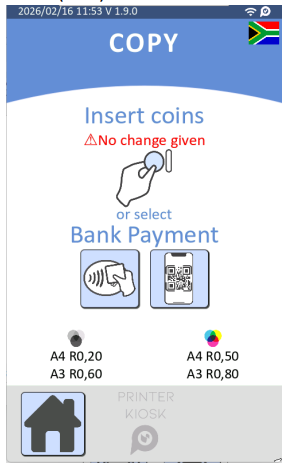
• Paystack Mobile Payment
o Integration of the Paystack gateway to facilitate mobile payment across supported African markets available in Nigeria (NGN), Ghana (GHS), South Africa (ZAR), Kenya (KES), Ivory Coast / Côte d'Ivoire (XOF)
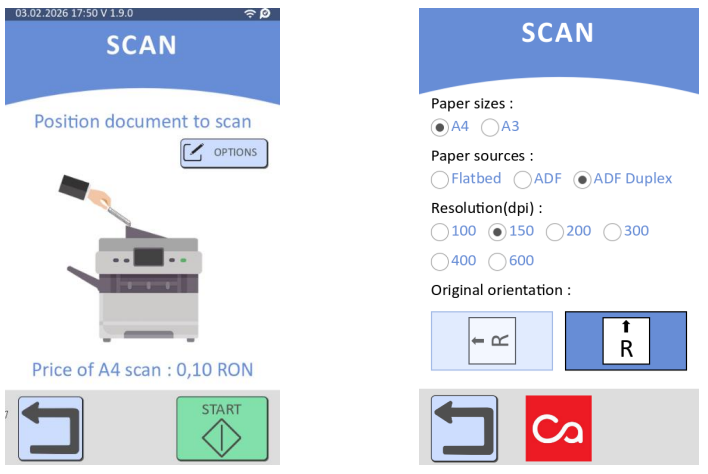
• Scan Management
o Added user-accessible scan options including quality (DPI), orientation, source (ADF/Platen), and paper size via a new configuration button in the scan workflow.
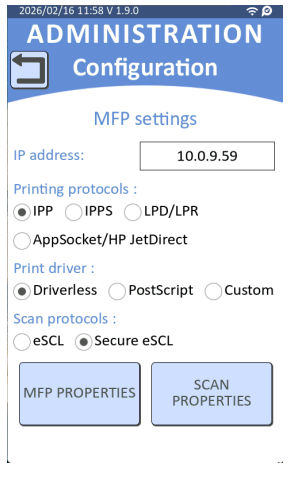
o Administrators can now select between eSCL and eSCL Secure protocols in the MFP configuration settings for enhanced scanning flexibility and security
• Print/Smart Copy Management
o Added detailed error messages during smart copy. When the MFP becomes unavailable after scanning, user can see specific error details including offline status, paper out, or device stopped conditions
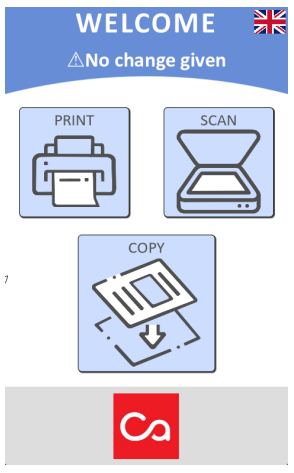
• Customer journey
o Added "No change given" warning message on home screen.
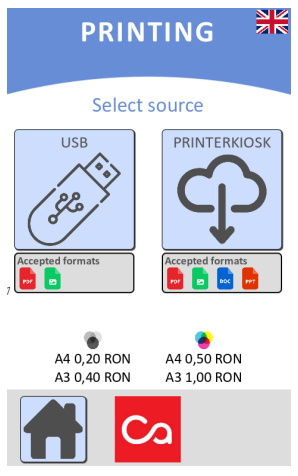
o Added display of accepted document formats on the print source selection screen for USB and PrinterKiosk modes to help users identify compatible file types
• Supported countries / Languages
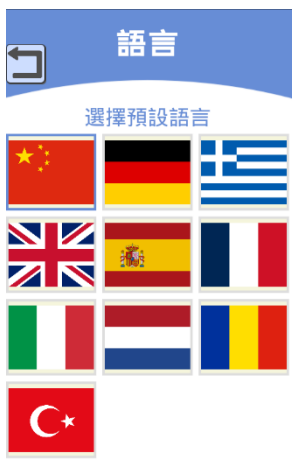
o Added support for Chinese
• Twint
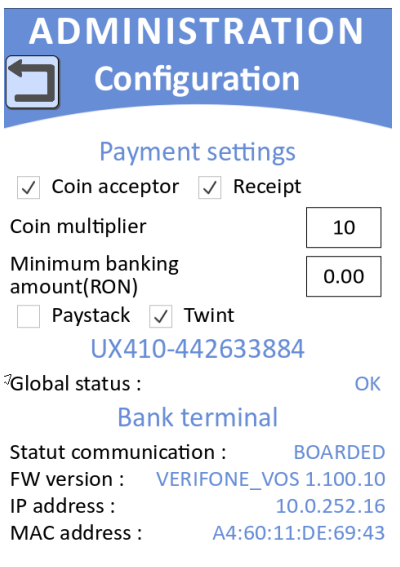
o Added TWINT activation toggle in the Payment settings menu, allowing administrators to enable or disable TWINT payment functionality
• Statictics
o Added EVA-DTS format export for counter statistics
Bug fixes and small enhancements
• Print/Smart Copy Management
o Improved color detection algorithm for more accurate image analysis and processing.
o Improved error handling for partial print jobs - the system now correctly enters error state when incomplete printing occurs after smart copy
• CartadisNPay
o Improved CartadisNPay configuration update mechanism to handle network initialization delays at startup, ensuring reliable configuration retrieval from the capture server.
• Update
o Resolved random USB update issues that could prevent successful firmware installation from USB devices
Version 1.8.2: 7th January 2026
Bug fix
•Maintenance release with internal corrections.
Version 1.8.1: 24th December 2025
Bug fix
•Maintenance release with internal corrections.
Version 1.8.0: 12th December 2025
New features
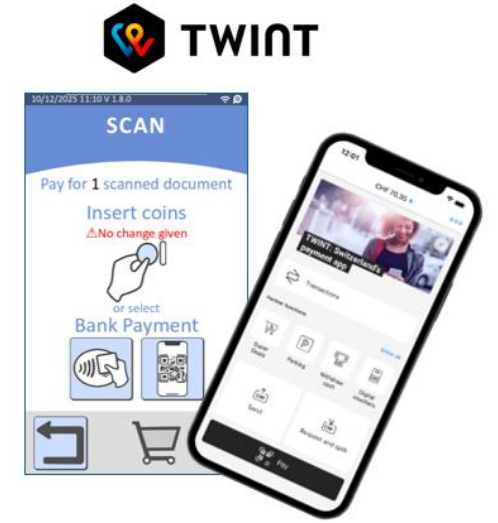
• Twint Mobile Payment support: Integration of the TWINT payment gateway to facilitate mobile payment.
• [PrinterKiosk] Configuration Lock: Blocks the possibility to deactivate PrinterKiosk when a Cartadis’nPay payment terminal is attached on the device (applied to eligible Cartadis’nPay countries).
• [PrinterKiosk] Multi-Document Selection: Enables users to select and process multiple documents simultaneously (for printing or deletion), significantly streamlining the user workflow.
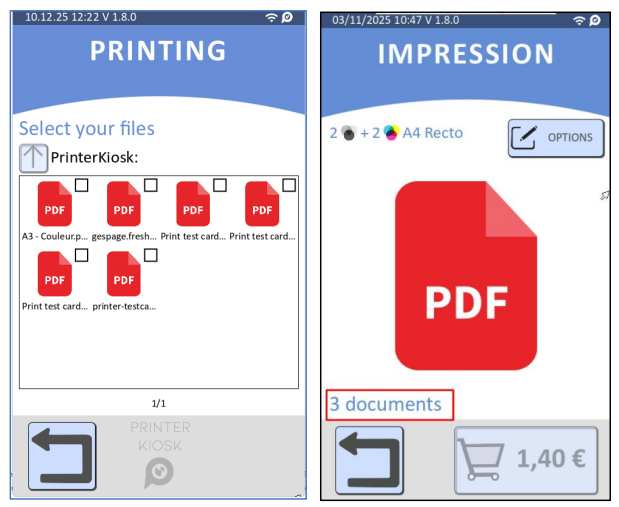
• [PrinterKiosk] Cloud Price Synchronization: Automatic synchronization of pricing configurations from the PrinterKiosk Pro cloud interface to the CMprint, ensuring real-time consistency and simplified management on prices.
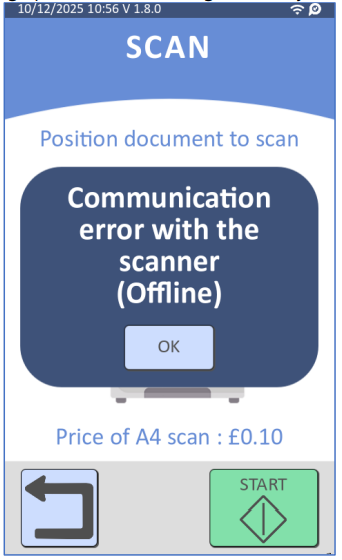
• [Scan] Advanced Scan Diagnostics: Enhanced error reporting during scan workflows by retrieving and displaying specific error messages directly from the MFP.
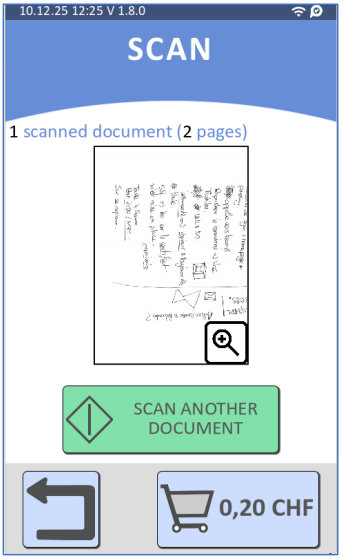
• [Scan] Real-Time Scanned Pages Counter: Interface update to display the live count of processed pages during a scanning job for better user tracking.
• [Printing] Granular USB Control: Added capability to specifically disable USB printing while keeping the PrinterKiosk printing workflow fully active.
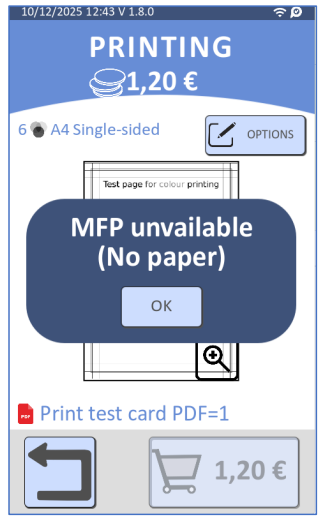
• [Printing] Enhanced MFP status message: Display of detailed diagnostic information within the "MFP Unavailable" pop-up to help users better understand connection or hardware status.
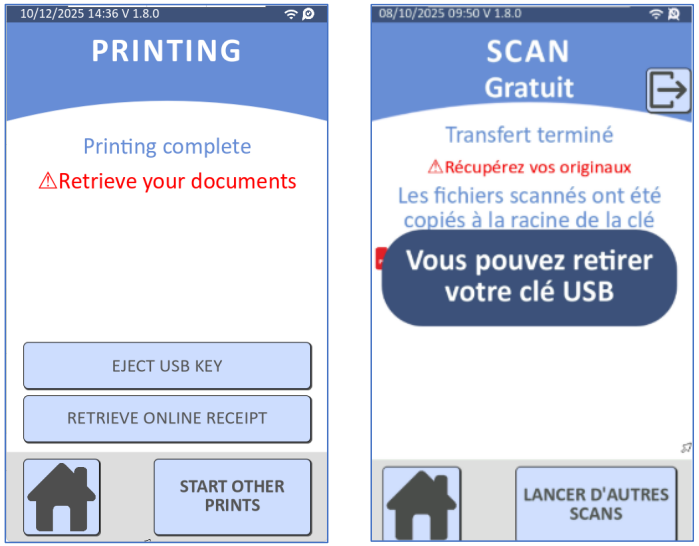
[Printing] Safe USB Ejection: Implementation of a dedicated on-screen "Eject" button to ensure safe removal of USB drives and prevent data corruption.
• [Uniflow] UniFlow Co-existence: Enables the CMPrint to operate on an MFP that is already running the UniFlow embedded interface, restoring the legacy compatibility found in the CM4000.
• [Bulgaria] Bulgaria Euro Support: Implementation of the Euro currency for the Bulgarian locale in anticipation of the transition on January 1st, 2026.
• [Switzerland] Swiss Localization: Addition of the Swiss flag in the language menu with French set as the default language for this region.
• [Austria] Austrian Localization: Integration of the Austrian flag for specific regional identification.
• [UI] Sleep Mode Control: Ability to disable the device's sleep mode to ensure continuous availability or permanent display.
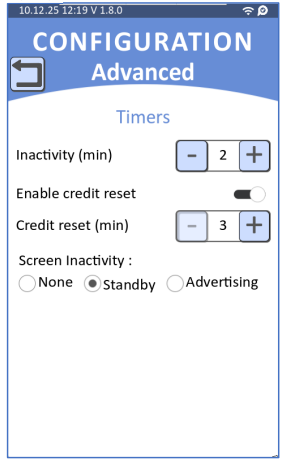
[UI] On-Screen Advertising: Feature allowing the display of custom promotional images or slideshows when the kiosk is in idle mode (screensaver).

[UI] UI Branding with logo : Option to replace the default PrinterKiosk (PK) logo with a custom client or partner logo on the user interface.
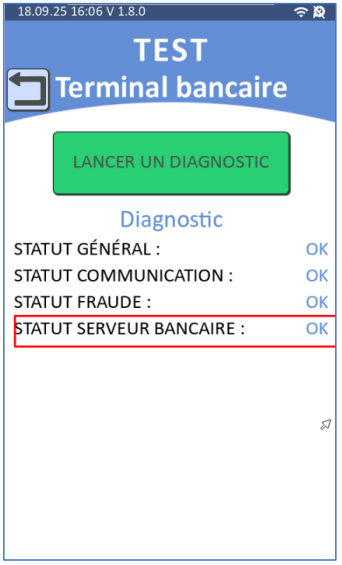
[Tests] Cartadis’nPay Advanced Network Diagnostics: Enhanced test menu capabilities to specifically validate Cartadis’nPay payment network flows and connectivity.
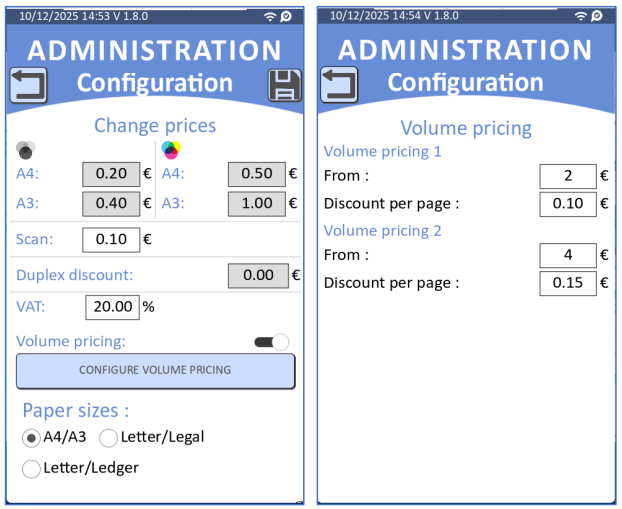
[Pricing] Sliding Scale Pricing: Implementation of degressive pricing structures to offer volume-based discounts automatically.
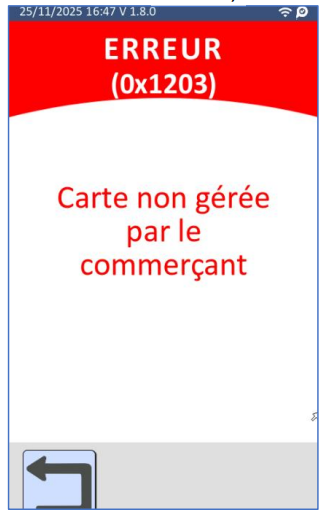
Non-EEA Card Blocking: Option to restrict transactions to European cards only to prevent high interchange fees associated with international cards (applied to eligible Cartadis’nPay countries).
Bug fixes and small enhancements
• Network Menu Stability: Resolution of a rare edge case causing errors within the network test interface.
• [Scan] Ricoh MFPs A3 pages Detection: Improved paper size detection logic for Ricoh MFPs to prevent A3 documents from being incorrectly identified as A4 during scanning.
Release Notes :
Version 1.7.3: 14th May 2025
New features
- PrinterKiosk features
- Improved the end of the printing journey to offer a dematerialized ticket.
- Scan Management
- Removed the dependency between scan-to-smartphone and PK subscription. The feature is enabled by default when the scan feature is enabled and can be configured in the Client Features menu (Administration > Configuration > Client Features). It is disabled when the scan feature is disabled.
- Improved flatbed scan guidance by showing portrait or landscape GIF based on scan orientation setting. Previously, only one GIF was shown regardless of orientation.
- Print/Smart Copy Management
- Significantly improved printing speed on Epson printers, reducing the print job startup time from 30 seconds to 5 seconds. This also enhances the user experience for Smart Copy.
- Note: This performance improvement disables duplex printing on Epson printers (driverless mode). To enable duplex printing, a custom driver must be used, which reintroduces the longer print processing time. Please contact Cartadis support to obtain the appropriate driver file.
- Add support for the JFIF image format
- Significantly improved printing speed on Epson printers, reducing the print job startup time from 30 seconds to 5 seconds. This also enhances the user experience for Smart Copy.
- Customer journey
- Added support for an "Out of service" mode, which can be activated via the Admin > Maintenance menu. When enabled, the CMprint displays an "Out of service" error message.
Bug fixes and small enhancements
- Print/Smart Copy Management
- Fixed an issue where print options were not correctly applied on Epson
- Scan Management
- Improved error handling and recovery when a scan fails or is interrupted, preventing infinite loading states.
- Fixed an issue where the second page of duplex scans from the ADF in portrait mode was scanned upside down (rotated 180°).
- UI/UX
- CMprint now wakes up from sleep mode automatically when coins are inserted.
- Improved dematerialized ticket proposal screen.
- Supported countries / Languages
- Added support for Botswana and Namibia.
- Updated printing option labels: "Simple-sided" is now "Single-sided" and "Double-sided" is now "Duplex" in the English language menu and print preview.
- Corrected several messages in Spanish.
Version 1.7.2: 31st March 2025
New features
- PrinterKiosk features
- Added support for reporting financial transactions from CMprint devices equipped with an MDB terminal.
Version 1.7.1: 29th January 2025
New features
- Supported countries / Languages
- Added support for Turkey
Bug fixes and small enhancements
- Cartadis’nPay
- oImplemented automatic retrieval of the UX410 terminal's IP address when it changes due to DHCP or network switch.
- Improved payment process handling in case of user cancellation or terminal busy status.
- Moved diagnostics logs to Debug level to reduce log pollution, ensuring errors are logged appropriately
- Admin menus
- Menu ‘Configuration > Network’
- 'Fixed issue where the subnet mask could not be set when using a static IP.
- Menu ‘Configuration > Network’
Version 1.7.0: 2nd december 2024
New features
- Client Features
- Added support for the Smart Copy feature
- Available on Brother, Epson, and Lexmark (excluding OEM) MFPs.
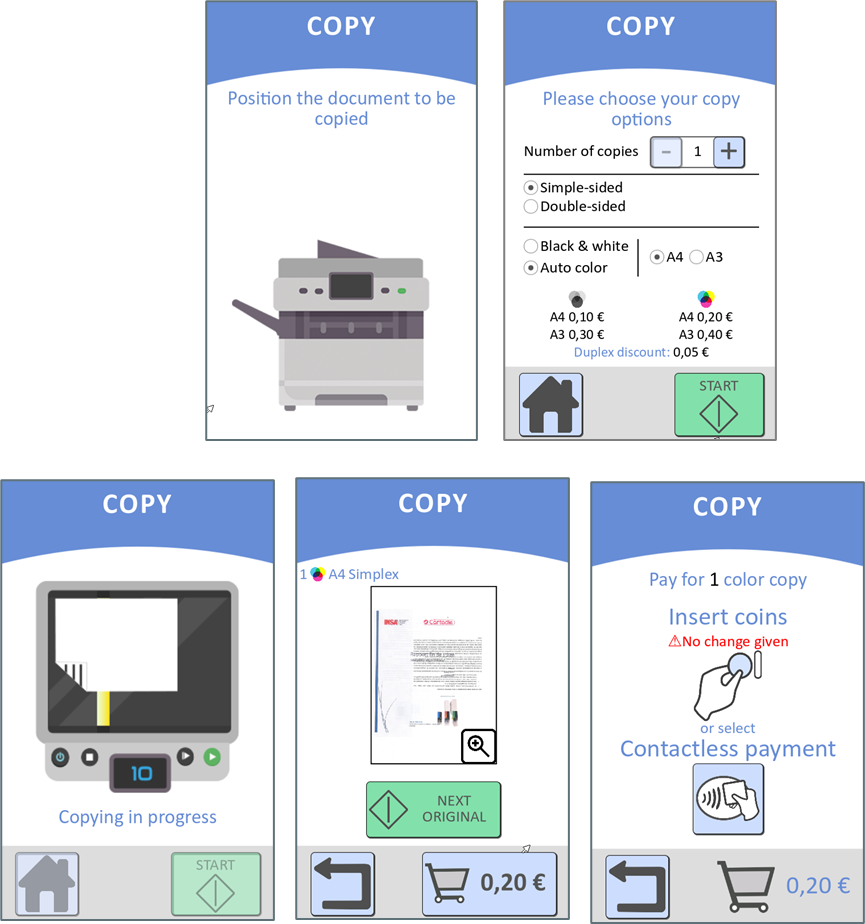
- The Smart Copy feature enables charging for copies made on multifunction printers that don’t include a built-in copier interface.
- With the Smart Copy feature, the entire copy customer journey is performed on the CMprint. With this dedicated user experience, a document preview feature allows users to review their documents before making a payment.
- In the CMprint administration menu, the feature appears in the Client Features menu (Administration > Configuration > Client Features) only once an IP address is entered in the MFP
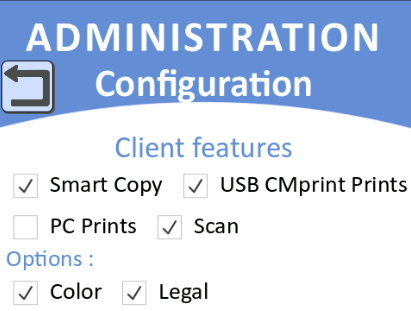 menu (Administration > Configuration > MFP) and a compatible MFP is detected. It can then be enabled or disabled.
 - From MFP configuration side, it is recommended to setup the MFP display accordingly to the CMprint use and disable the MFP copy menu.
- Added support for the duplex discountfor copying (available only on Konica Minolta and Canon MFPs with serial copier interfaces) and for printing (on all brands).
- The duplex discount amount is set in the ‘Price and Formats’ menu (Administration > Configuration > Price and Formats). Once configured, the discount will be displayed on the copy screens (for compatible MFPs) and the printing screens.
- One duplex discount amount is discounted for each 2-pages price.
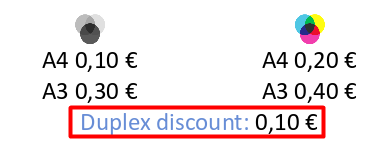
Limitation (for copying on Konica Minolta only): Users must have credit for at least two simplex copies, even when performing a duplex copy.
- Scan Management
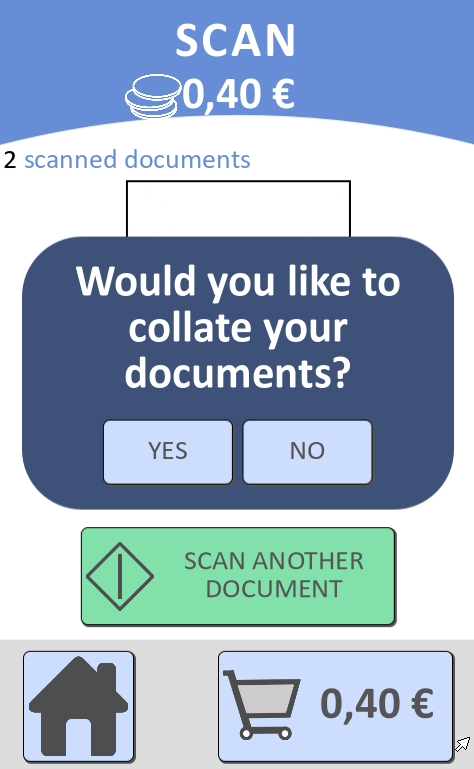
- Added the ability to combine all scans into a single PDF file when using the flatbed scanner.
- Supported USB formats
- Added support for the NTFS format and USB drives without partition.
- Admin menus
- Added the default language menu (Administration > Configuration > General Configuration > Language), allowing the selection of a language from those supported by CMprint. This menu is useful for countries with multiple official languages.
- Added the ‘Expert’ menu, which is accessible exclusively with the assistance of a Cartadis technician.
Bug fixes and small enhancements
- User experience (UI/UX) improvements
- Added the sleeping screen: CMprint will transition to this screen after the inactivity timeout, displaying the current date and time on a black screen.
- Replaced the 'Scan' button with a green 'Start' button on the scan screen.
- Added prices information in printing homepage
- Improved the payment screen by adding the message 'No change given' for coin payments and changing 'Bank Card Payment' to 'Contactless Payment'.
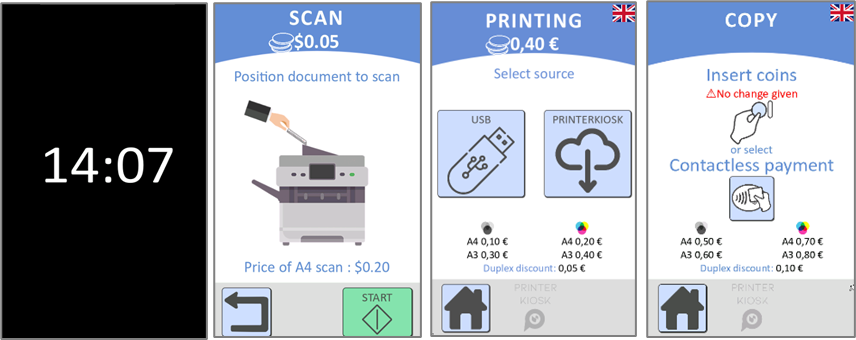
- Replaced the 'Color' option by 'Auto color' option in the option screens.
- Improved the dematerialized receipt proposal in the copy and the PC prints customer journeys: a dematerialized receipt is now automatically proposed to the user when CMprint transitions to the payment screen (if their credit is less than the minimum price).
- Enhanced animations: GIFs have been improved for a smoother playback and a faster loading.
- Print Management
- Added the file size limitation (25Mb) for the USB printing
- Added support for the free mode for PrinterKiosk printing
- Adjusted the handling of toner level status: Printing is no longer blocked when the MFP reports a toner level of 0, as this status may be unreliable.
- Scan Management
- Improved error handling for scanning.
- Admin menus
- Statistics menus
- Fixed a display issue in the coin statistics menu following an installation country change.
- Test menus
- Fixed an issue where coin insertions were ignored when returning from test menus to client mode.
- Supported countries / Languages
- Added support for Kenya and South Africa.
Version 1.6.0: 22nd July 2024
New features
- Print Management
- Added support for the PC Prints feature
- Available on Ricoh, Konica Minolta, Toshiba, Xerox, and Sharp MFPs.
- This feature allows paying print jobs with the CMprint for jobs submitted from computers on the LAN. When the user pays the documents price, the MFP will be unlocked, and the user can release his jobs using the PIN code entered in the Print Driver (through the Secure Print option on the PC).
- It can be activated from the menu Admin > Configuration > Client features.
- The PC Prints feature is incompatible with USB and Email printing. This means that if PC Prints is activated, USB Prints and PrinterKiosk Prints will be automatically deactivated.
- Added support for the PC Prints feature
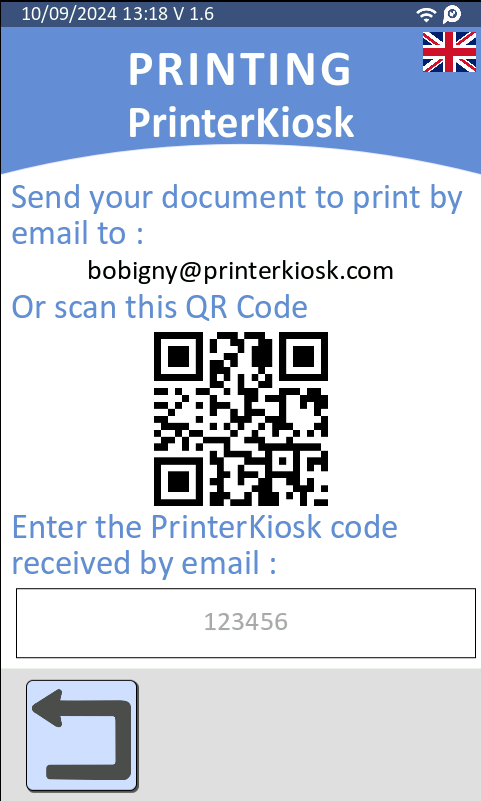
- Email printing with PrinterKiosk
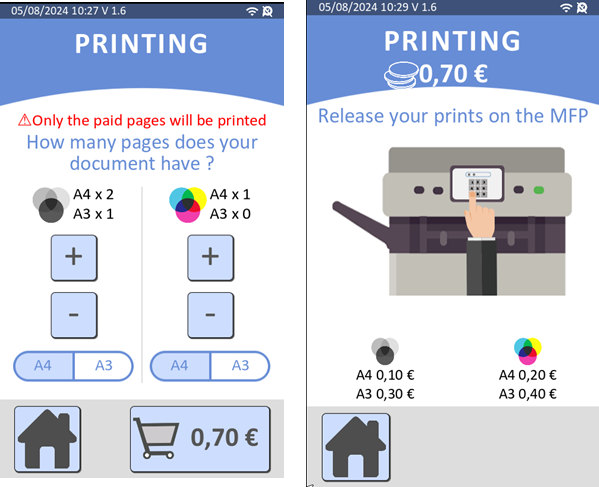
- Added support for print options: page selection, number of copies.
- Improved the email printing screen by displaying instructions to better guide the user. This includes showing the associated email and a QR code for the email.
- Added support for print options: page selection, number of copies.
- Copy Management
- [HP MFP] Starting with the upcoming HP firmware FutureSmart version 5.9, it would be possible to have two separate prices for B&W and colour on a colour HP MFP.
- Admin menus
- Configuration menu
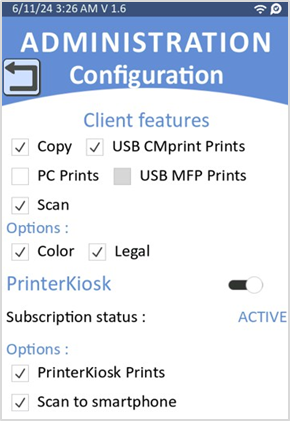
- Client features new menu
- This menu is dedicated to ease configuration.
- It is used to activate/deactivate client features such as copy, print, scan options, and PrinterKiosk feature with its options.
- Client features new menu
- Configuration menu
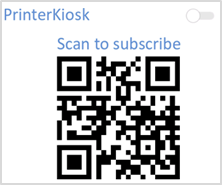
- A QR code to go to the PrinterKiosk web page will be displayed if the PrinterKiosk feature is deactivated
Bug fixes and small enhancements
- Customer journey
- Users can now insert coins from the home screen. CMprint displays the copy menu upon coin insertion.
- The credit is no longer displayed if its value is zero to enhance the user experience and avoid misunderstandings between the current credit and the amount to pay.
- Improved the page selection option for USB printing. User can now select the pages to print in the print option screen using the format “X,Y,M-P” instead of only a range like “M-P”.
- PrinterKiosk
- E-mail printing with PrinterKiosk
- Removed the paper format selection option, that is not yet available.
- Improved the transaction sending process in case of power outages.
- E-mail printing with PrinterKiosk
- Print Management
- Improved end-of-printing detection and printed page counting for USB printing through IPP/IPPS protocol.
- Improved behaviour when the USB stick is removed during the USB printing process.
- Scan Management
- Improved the scan process speed.
- Fixed incorrect detection of scan orientations on some MFPs.
- Statistics
- Fixed a rare case where some inserted coins were missing in the statistics.
- Added inserted coin quantity statistics in the collection report.
- Admin menus
- Admin top menu
- CMprint OS version is now displayed on the admin top menu.
- Statistics menu
- Added inserted coin quantity statistics in the menu Statistics > Sales revenues > Coins.
- Admin top menu
- Supported countries / Languages
- Added support for the Netherlands.
- Firmware upgrade by USB
- Starting from version 1.6, CMprint does not require a specific name for the firmware update file. Only the .usbCartadis extension is mandatory. Future versions will be delivered with the updated file named update.usbCartadis instead of just .usbCartadis.
Version 1.5.0: 15th February 2024
Bug fixes and small enhancements
- PrinterKiosk features
- Fixed support for B&W-only MFP.
- PrinterKiosk production parameters are now setup by default
Version 1.4.1: 15th December 2023
Bug fixes and small enhancements
- Print management
- Improved print time for IPP/IPPS printing with the Postscript driver option.
- Dematerialized receipt
- Correction in the receipt generation when user pays by cash.
- Configuration
- Fixed possible issue on the coin mechanism activation from administration menu.
- PrinterKiosk
- Improved transaction reporting to PrinterKiosk back-office.
Version 1.4.0: 17th November 2023
New features
- Bankcard Payment
- Added support for Cartadis’n Pay with the Verifone UX410 terminal:
- Add the Cartadis’n Pay bankcard receipt in the online receipt if the dematerialized receipt service is enabled.
- Refund options for total or partial payments done through Cartadis’n Pay if the print or scan service is not delivered or is only partially delivered.
- Minimum amount for bankcard payment can now be configured in the admin menu (Configuration > Payment menu).
- Added support for Cartadis’n Pay with the Verifone UX410 terminal:
- PrinterKiosk features
- Email printing through PrinterKiosk can now be activated with a subscription.
- All financial transactions and other statistics of CMprint can be viewed through a back- office website for PrinterKiosk subscribers.
- Email printing through PrinterKiosk can now be activated with a subscription.
- MFP features management
- It is now possible to enabled/disabled the MFP features (copy, print, scan) independently. At least one MFP feature must be enabled, and it is configurable in the admin menu (Configuration > MFP menu).
- Print management
- Improved IPP/IPPS print driver management with three modes of printing:
- Driverless (default): Driver automatically retrieved by CMprint using the IP address of the MFP.
- PostScript (new mode): Default Postscript driver used when the MFP does not support driverless.
- Custom (new mode): Driver manually installed from a USB stick (requires a Linux driver).
- Improved IPP/IPPS print driver management with three modes of printing:
- Scan features
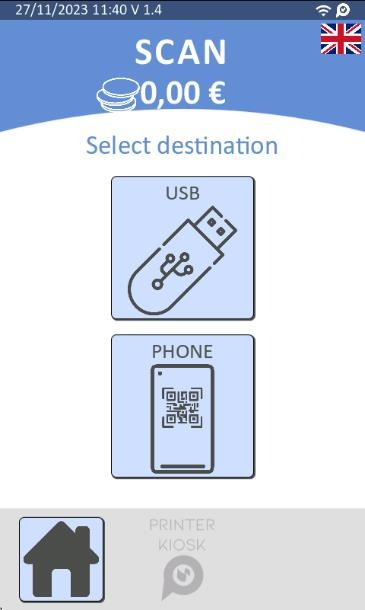
- Added support for the scan-to-smartphone feature.
- At the end of scanning process, the user scans the displayed QR code with their smartphone to retrieve the scanned documents.
- This feature is included in the PrinterKiosk subscription.
- It can be enabled in the admin menu (PrinterKiosk menu)
- Added support for the scan-to-smartphone feature.
- Free scan can be now possible by setting scan price at 0 in the admin menu (Configuration > Formats et Prices menu).
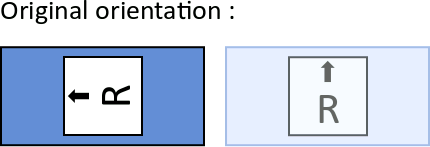
- The default scan orientation will be determined by the tray size
- If the tray is large or unknown size, the default orientation will be portrait, and the orientation can be changed in the admin menu (scan properties menu).
- Otherwise, if the tray is small, only the landscape orientation will be available and displayed in the scan properties menu.
- The default scan orientation will be determined by the tray size
- Dematerialized receipt
- CMprint provides now a dematerialized receipt when paying by cash.
- At the end of the print and scan journey
- When the user clicks to the “Home” button for the copy journey
- CMprint provides now a dematerialized receipt when paying by cash.
- Admin menus
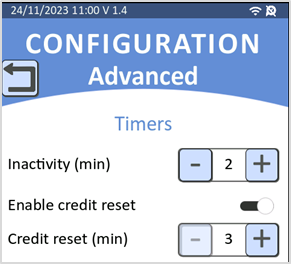
- Advanced configuration menu
- Added the possibility to modify the inactivity timer and reset credit timer.
- Advanced configuration menu
- Test menus
- Added diagnostic menu for Cartadis’n Pay bankcard terminal
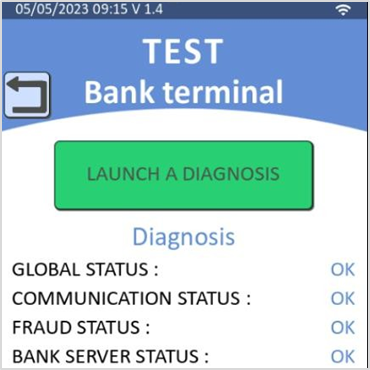
- Bankcard payment test now includes a message indicating refund at the end.
Bug fixes and small enhancements
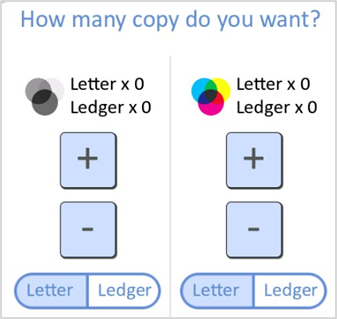
- Copy customer journey
Improvement of the copy selection screen regarding the format selection in case of bank card payment customer journey.
- Print Management
- Improved file analysis process
- Enhanced the process for counting printed pages on supported MFPs.
- Scan Management
- Fixed an orientation selection issue when scanning from ADF (Automatic Document Feeder).
- Supported countries / Language
- Add support for Australia and New Zealand.
- Admin menus
- Configuration menu
- Display the MAC address of CMprint in the network menu.
- Configuration menu

- Statistics menu
- Fixed a bug where the collected file might not be printed after previewing it.
- Maintenance menu
- Add the possibility to retrieve logs onto a USB stick.
- Test menus
- Improved the button for free mode
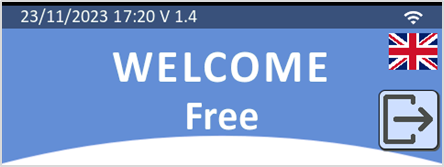
- Added “total coins” information in the coin acceptor menu.
- Logs
- Improved logs to track user’s actions.
- Hardware Improvements
- USB client port is now connected to the micro-USB port of the main board, providing improved support regard some low quality USB sticks.
Version 1.3.1: 3rd April 2023
Bug fixes and small enhancements
- Clock management
- With the integrated battery, the date and time are now kept and updated when CMprint is powered off.
- CMprint automatically updates date and time if connected to the Internet thanks to the synchronization with the predefined NTP server.
- In case of no network, the date and time can be manually set in the admin menu (Configuration > General > Date/Time menu)
- With the integrated battery, the date and time are now kept and updated when CMprint is powered off.
- Supported countries / Language
- Improve translations for scan features
Version 1.3: 10th March 2023
Bug fixes and small enhancements
- Customer journey
- Dematerialized receipt
- The receipt will not be offered to the user in case of lack of network connection
- Dematerialized receipt
- Print and Scan management
- Fix margin issue when printing and scanning from CMprint on some MFP
- Supported countries / Language
- Add support for Mexico, Colombia, Canada, and Chile
- Admin menus
- Maintenance menu
- Add the possibility to enable the remote operation. Enabling remote operation allows to remotely operate the CMprint on a computer or mobile device such as smartphone using a VNC client (RealVNC recommended).
- Maintenance menu
- Payment menu
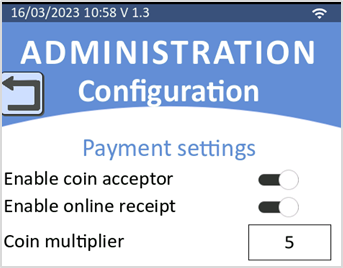
- Dematerialized receipt service can now be disabled from this menu
Add a new advanced parameter ‘coin multiplier’ required to tune the accepted coins range for currencies with coins with a high value (for example: 10 pesos Mexican coin). By default, coin multiplier = 5 with a coins range from 0.05 to 5.00, for coin multiplier = 10 the coins range would be from 0.10 to 10.00.
- Test menus
- Coin acceptor test
- Each coin insertion is now prompted (new line added) even when inserting the same coin
- Coin acceptor test
Version 1.2: 24th February 2023
New features
- Customer journey
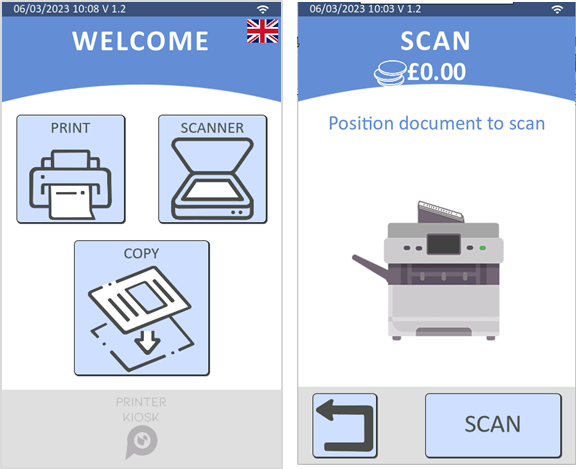
- Add the Scan to USB feature.
- The user can use this function through the scan button on the home page.
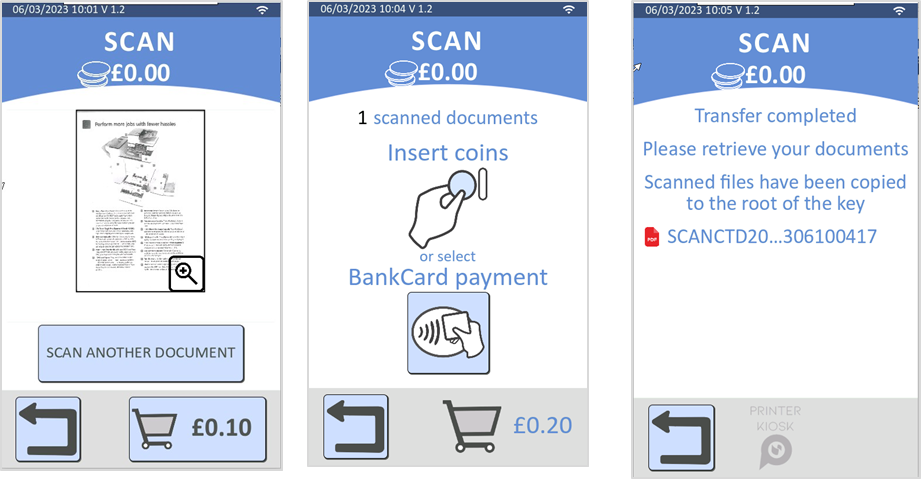
- A preview of the scanned documents is available.
- Scanned documents are transferred on the USB stick after payment.
- This requires the printer to be AirScan (eSCL) compatible (compatibility can also be checked through CartadisDB online documentation)
- Add the Scan to USB feature.
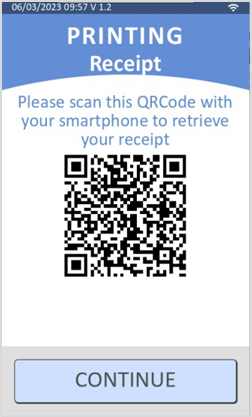
- Add a dematerialized receipt feature
- The user can retrieve his receipt on his smartphone by scanning a QR Code
- This receipt is offered only for payment by bankcard.
- Print management
- Add support for new printing protocols
- This advanced configuration provides support for an extra range of printer configurations.
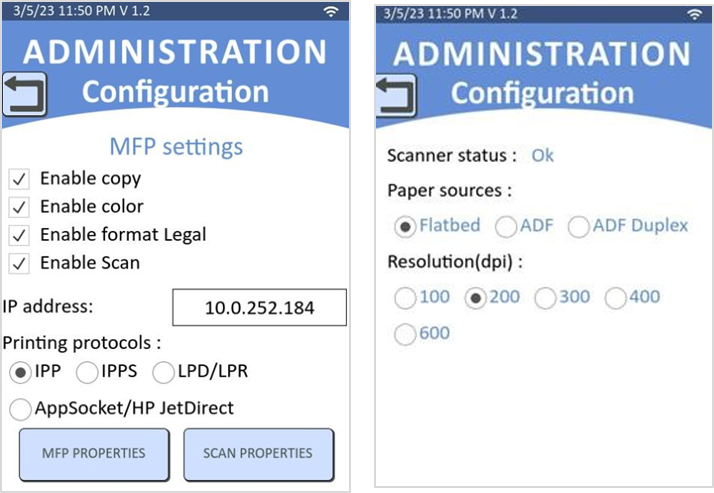
- Added printing protocols: IPPS, LPD/LPR, AppSocket/HP JetDirect
- The default printing protocol is IPP.
- Printing protocol can be modified in the admin menu (MFP menu)
- Add support for new printing protocols
- Copy management
- Add support for US paper formats
- MFP paper format (A4/A3, Letter/Legal, Letter/Ledger) can now be setup in the admin menu (MFP menu)
- Letter/Legal format is now the default paper format for US installation.
- Add support for US paper formats
- Prices
- Add the VAT rate parameter
- The VAT information is indicated in the customer dematerialized receipt.
- The VAT rate can be configured in the prices and formats menu.
- Add the VAT rate parameter
- Firmware
- Firmware upgrade of the peripheral USB interfaces
- The peripheral interfaces firmware upgrade is now automatically included in the CMprint firmware upgrade process
- It is also possible to install manually a peripheral interface firmware with an USB key through the admin menu (maintenance menu)
- Compatible peripheral interfaces
- KCC: parallel copier interface (from hardware version CI21210)
- SIM: serial copier interface (from hardware version CI21510)
- iMDB: bank card terminal interface (from hardware version CI21410)
- Firmware upgrade of the peripheral USB interfaces
Bug fixes and small enhancements
- Customer journey
- In the copy screen, add a button to allow the user to top-up extra credit through bank card whatever the current balance.
- Supported countries / Language
- Improve German and Italian translations.
- Print management
- Fix an issue where the end of the print job was not being detected in some cases.
- Copy management
- Improve reliability in case of the serial interface configuration.
- Admin menus
- Free mode
- Free mode button is now moved to the top admin menu.
- MFP menu
- Add the possibility to disable scan function.
- Add scan properties configuration screen.
- Free mode
- Network menu
- Add possibility to disable the VPN connection.
- Add DNS server configuration when DHCP is disabled.
- Test menus
- Add a network test (ping test)
- Add a serial copier interface (SIM) test menu. This test requires to connect a dedicated test cable to the Sub-D connector.
Version 1.1: 21st September 2022
New features
- Customer journey
- Add the support for printers, without copy function. When the copy function is disabled, CMprint starts directly to the printing home screen.
- Add support for print option for portrait / landscape mode
- Add support for Canon MFP with serial interface (requires the SIM interface card version 1.1.0)
- Add support for printers with the IPP protocol version lower than 2.0
- Add support for Romania, Ireland, and Belgium
- Add the support for printers, without copy function. When the copy function is disabled, CMprint starts directly to the printing home screen.
- Supported bankcard terminals
- Add support for Ingenico Self 2000
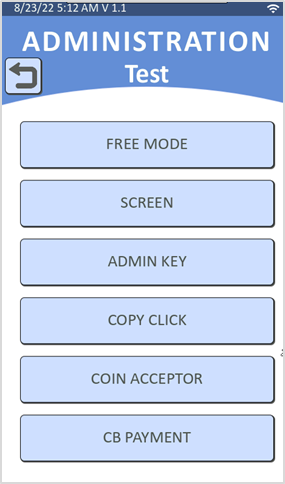
- Admin menus
- Add test menus
Bug fixes and small enhancements
- Supported countries / Language:
- Improve German and Spanish translations
- Configuration
- Fix static IP configuration issue
Version 1.0: 17th May 2022
First official firmware for CMprint product
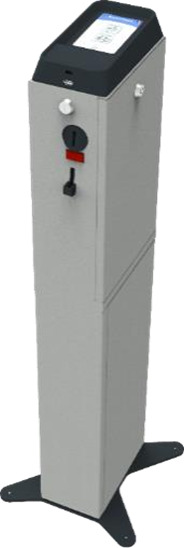
CMprint enables prints and copies to be paid by coins or bank cards in self-service environment.
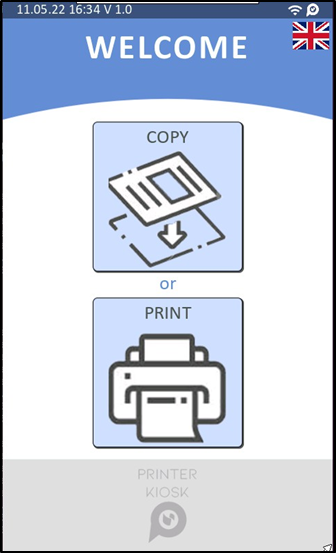
The supported peripherals (options) are: coin acceptor, MDB bank terminals (Nayax or Ingenico), Cartadis copier management interface (KCC for parallel copier interface or SIM for serial copier interface)
The main customer operations with the CMprint are:
- Copy
- In cash, inserting coins displays the credit on the screen.
- By bank card, after having selected the information of the job to be carried out, the amount of the transaction is evaluated.
- In cash, inserting coins displays the credit on the screen.
- Once validated, the user presents his bank card to pay his copy credit which is displayed on the screen.
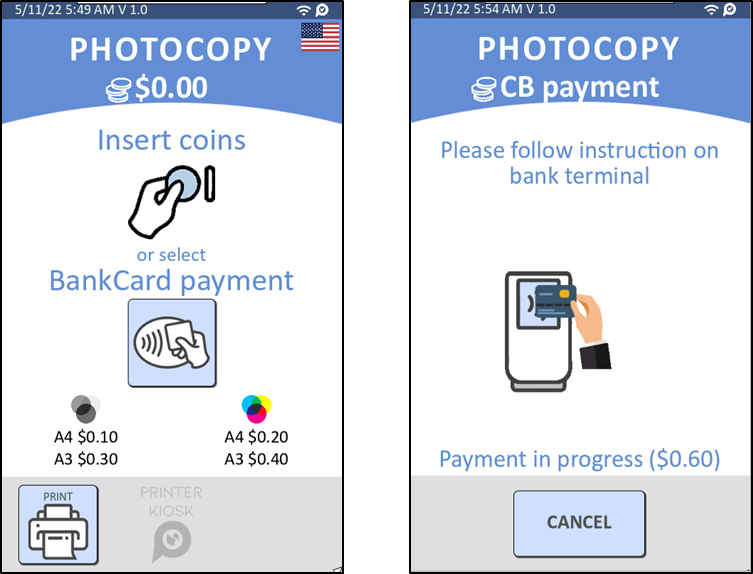
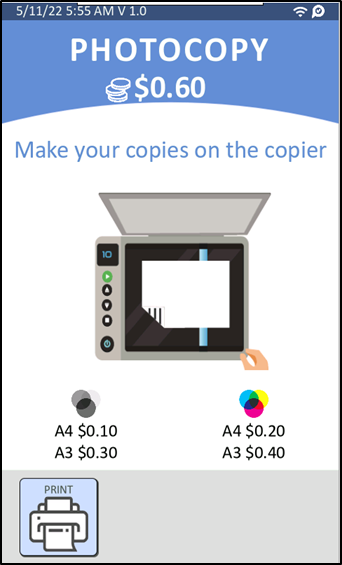
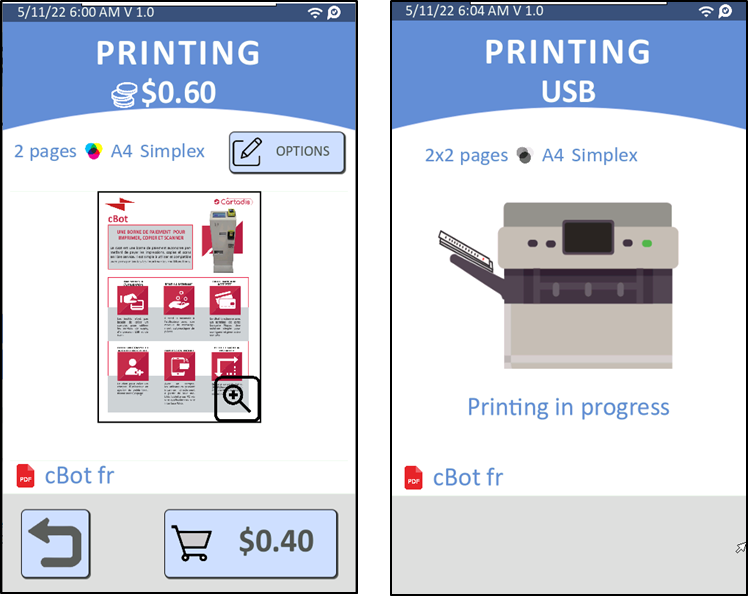
- USB prints
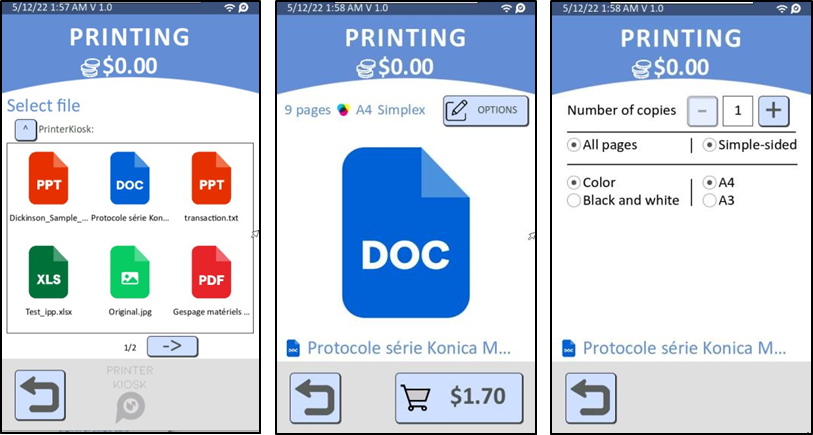
- Inserting the USB key at the bottom of the touch screen and selecting files and pages, as well as printing parameters (format, black & white or colour, number of copies), and document preview.
- In cash, the credit must be equal to or greater than the selection.
By credit card, the user presents his credit card to pay for his prints
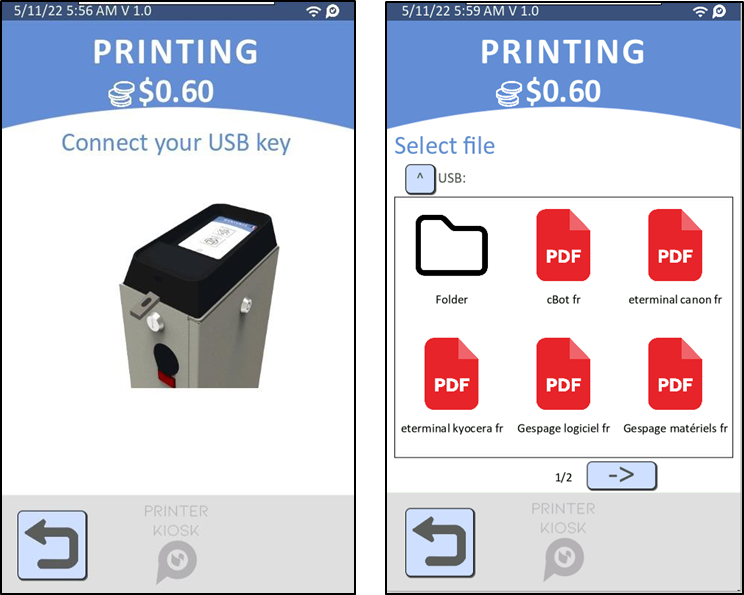
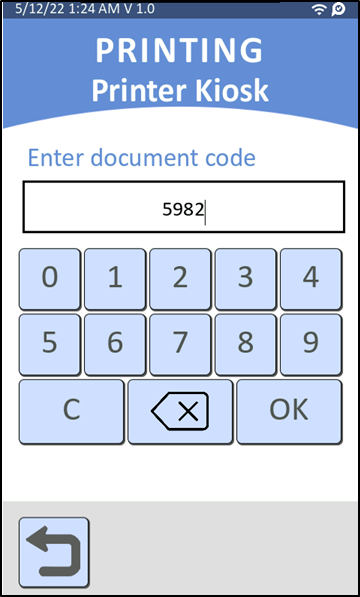
- Email printing through PrinterKiosk (Beta)
- The user sends one or more documents by email, he receives in return an email giving him a printing code.On the machine, he types his printing code and is invited to select the information on the job to be done (format, black & white or colour, number of copies), he can then pay in cash or by credit card.
- Note: Printer Kiosk is only available for Beta use for the moment.
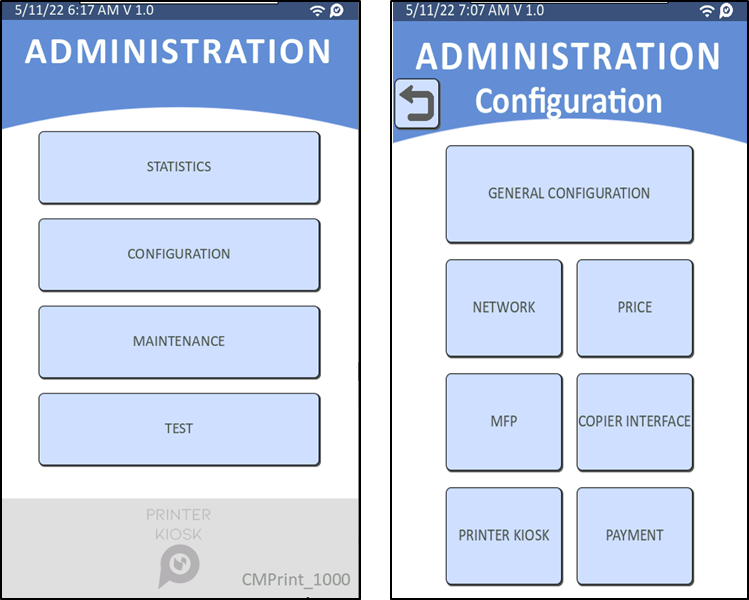
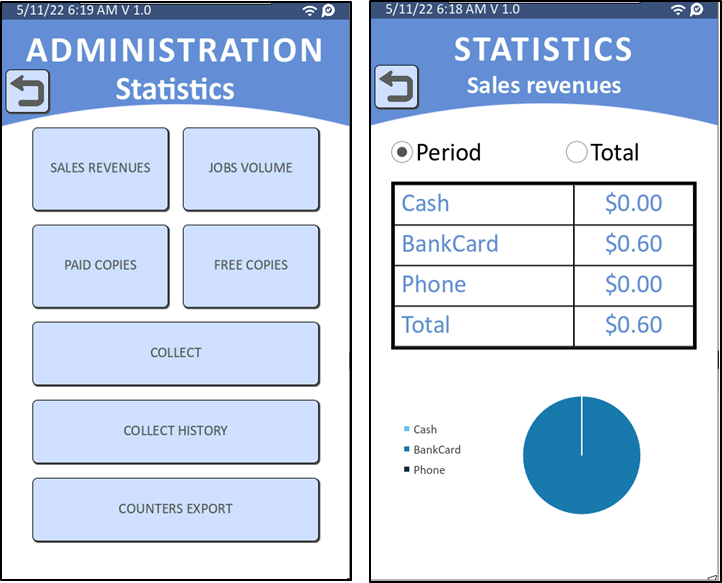
Statistics menu on CMprint provides various accounting information and manages the cash collection:
- SALES REVENUES: repartition of the sales by means of payment.
- JOBS VOLUME: repartition of the sales by type of print job (Copy, Print from USB…).
- PAID COPIES: repartition of the sales by type of document (A3 / A4, B&W / Colour).
Was this article helpful?
That’s Great!
Thank you for your feedback
Sorry! We couldn't be helpful
Thank you for your feedback
Feedback sent
We appreciate your effort and will try to fix the article