Billing Export: Information notice
This article guides you step by step through a simple explanation of how billing and payouts work when using PrinterKiosk with the Cartadis'n Pay card payment solution.
It gives you a clear view of how fees are calculated, how your funds are paid out, and how to read your invoices and associated reports.
Good to know: 1 CMprint with Cartadis'n Pay and PrinterKiosk = 1 subscription
1. The fees applied to your business
Your card payment business comes with two billing services, detailed below in full transparency:
Country | Monthly fee | Card type | Fixed fee per transaction |
Euro Zone | 15.00 € excl. VAT | EEA card | 0.05 € excl. VAT |
|
| Non-EEA card | 0.20 € excl. VAT |
Switzerland CHF | 15.00 CHF excl. VAT | EEA card | 0.05 CHF excl. VAT |
|
| Non-EEA card | 0.20 CHF excl. VAT |
UK GBP | 13.00 GBP excl. VAT | — | 0.05 GBP excl. VAT |
Australia AUD | 24.00 AUD excl. VAT | — | 0.15 AUD excl. VAT |
New Zealand NZD | 30.00 NZD excl. VAT | — | 0.10 NZD excl. VAT |
Hong Kong HKD | 135.00 HKD excl. VAT | — | 0.50 HKD excl. VAT |
USA USD | 15.00 USD | — | 0.40 USD + 4% |
* EEA: European Economic Area
Non-EEA cards are declined by default; to accept them, you must contact Cartadis.
The monthly subscription
With the PrinterKiosk subscription you get a complete, modern and immediately operational solution to develop a genuine self-service printing offering.
The subscription gives you access to PrinterKiosk, a high-performance platform that allows any type of document to be printed from a computer, tablet or smartphone, while also offering practical, expected services such as direct scan-to-smartphone. By joining the PrinterKiosk ecosystem, you also benefit from the visibility and appeal of a well-established network of users accustomed to finding and using these printing points every day.
This subscription also includes the Cartadis'n Pay payment solution, designed to give your customers a simple, smooth and fast purchasing experience, with broad support for CB, Visa and Mastercard cards as well as smartphone payment. It therefore forms a complete package for offering a useful, accessible and attractive service, while making transaction collection easier. It is:
Billed in arrears: invoicing takes place at the start of the following month, for the previous month.
Debited from your CMprint account: it is deducted from your card revenue awaiting payout, not directly from your bank account.
Here is the path of a card transaction: 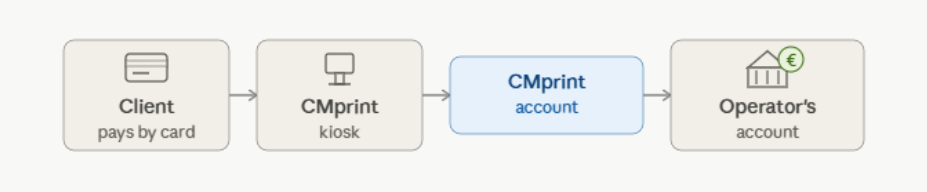
Subscription billing (Monthly processing)
At the start of each month, we generate the previous month's invoice and debit the subscription according to the available balance:
(these rules adapt according to the country's currency)
CMprint balance | What happens? |
Balance > 18 € | The subscription is debited immediately on the day the invoice is issued. |
Balance < 18 € | The debit is deferred: it will be carried out during the month, as soon as the balance is sufficient. |
Please note: subscription invoices that are not debited (due to insufficient funds) remain due and will be debited retroactively once the balance of the Cartadis'n Pay account is sufficient.
The invoice is available in your PrinterKiosk Pro area, in the Reports section (FAC file).
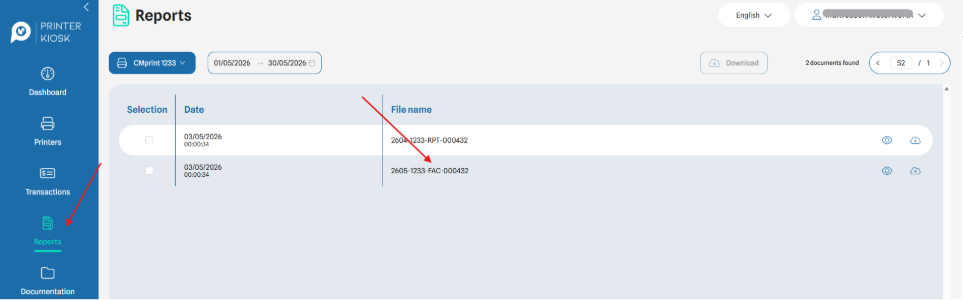
Reading your monthly invoice
Box 1 — Fee breakdown |
Line 1 — PrinterKiosk subscription + payment gateway: Fixed monthly amount (already debited if the balance is sufficient, otherwise it will be debited later). *Refer to the table at the top. Line 2 — PrinterKiosk processing + bank fees: the sum of all per-transaction commissions for the month. These fees have already been debited at the time of each transaction. *Refer to the table at the top. |

Box 2 — Net amount payable |
Sum of the fees: subscription + transaction fees debited from your Cartadis'n Pay account. |

The concept of a "batch" (group of transactions)
Transactions are grouped into lots, called batches. Each batch is identified by a unique number. This number lets you link:
the transactions detailed in the transaction exports you can generate from the "transactions" tab of your PrinterKiosk Pro area.
the payouts visible on your bank account.
Important note on subscription batches |
The subscription can only be debited via a transaction batch. It is therefore higher than the actual subscription price, and the surplus will be automatically re-credited to your Cartadis'n Pay account. |
Bank transaction fees
The commission is debited automatically and in real time, as soon as your customer pays by card.
Concrete example |
A customer pays 2.00 € by card (EEA card): |
|
|
2. The billing and payout cycle
Here is how your account is processed each month, step by step.
Daily processing
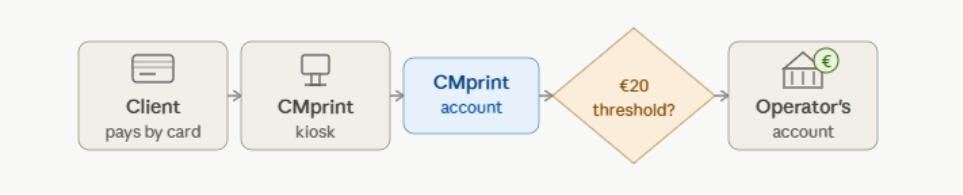
Each day, Cartadis'n Pay analyses the balance of your CMprint account:
(these rules adapt according to the country's currency)
Condition | Action |
CMprint balance > 20 € | A payout of card revenue (less subscription fees) is made to your bank account. |
CMprint balance ≤ 20 € | No payout. The balance stays on your CMprint account, awaiting the minimum amount for a payout. |
3. Monthly report
A report is made available at the same time as the invoice in the "Reports" tab under (RPT file).
It is structured into three complementary field.
Box 1 — Collections (what your customers have paid)
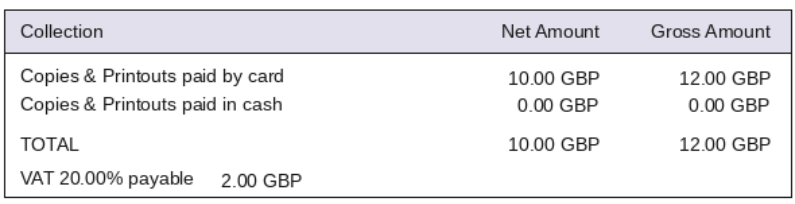
Line | Content |
Card payments | Total customer payments by card over the period. |
Cash payments | Total customer payments in coins over the period. |
Total | Sum of the two payment methods. |
Box 2 — Disbursements (the fees)

This box reproduces exactly the breakdown of your invoice: subscription and per-transaction commissions. It mirrors Box 1 of the invoice.
Box 3 — Payout information

Information | Meaning |
Amount transferred | Amount transferred to your bank account during the period. |
Amount pending | Balance of pending operations on the Cartadis'n Pay account (for payout or subscription payment). |
4. Performing your bank reconciliation
To reconcile your card collections with your bank transfers, follow these steps:
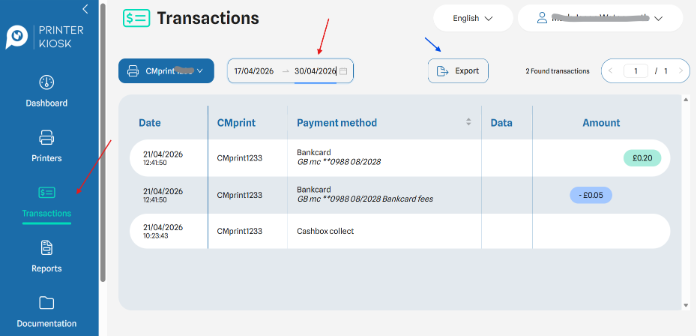
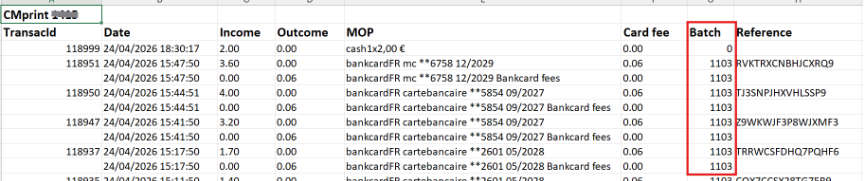
Export a transaction statement from the "transactions" tab in your PrinterKiosk Pro portal in Excel format, selecting the monthly period.
Identify the batch numbers in the exported file: each batch corresponds to a transfer or a debit on your Cartadis'n Pay account.
Match the entries by aligning the batch numbers between the PrinterKiosk export and your bank movements.
Identify the unreconciled entries. The amount pending on the Cartadis'n Pay account is explained as follows: gross customer transaction payments – commissions incl. VAT – subscriptions incl. VAT + pending operations for month M – balance of pending operations for month M-1.
Key reminder for reconciliation |
The amount transferred to your bank account will never equal the total of transactions minus fees alone. |
The difference is explained by the amounts temporarily pending on the Cartadis'n Pay account. These amounts will be paid out during subsequent processing runs. |
Was this article helpful?
That’s Great!
Thank you for your feedback
Sorry! We couldn't be helpful
Thank you for your feedback
Feedback sent
We appreciate your effort and will try to fix the article